
Inmigreat: USCIS Case Tracker
Inmigreat LLCTools
4.9306.00 Reviews
- Version
- 2.3.53
- Installs
- 100.00K
- Age Rating
- Everyone
Screenshots
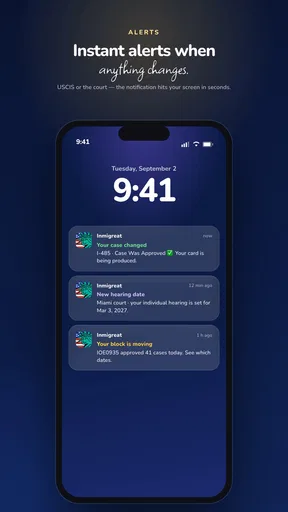
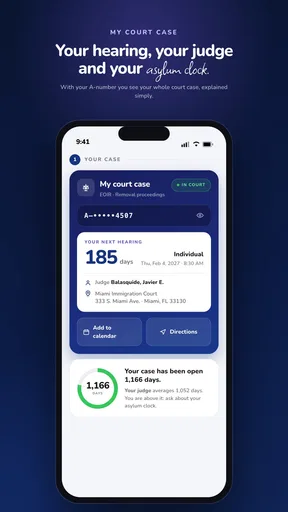
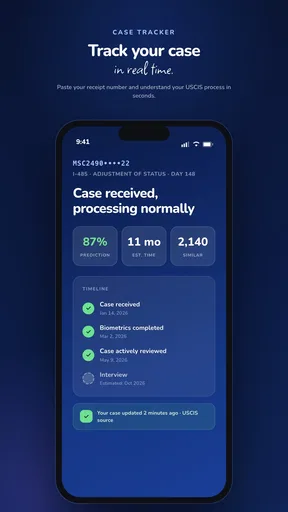
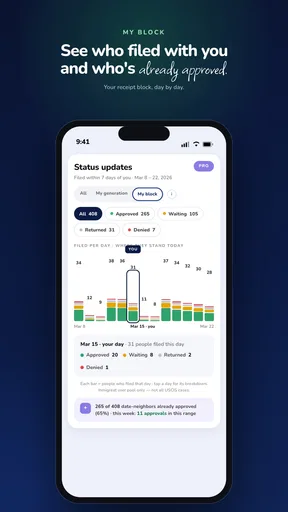
Our Review of Inmigreat: USCIS Case Tracker
 Analysis by Appyee
Tracking an immigration case can turn an already stressful process into a daily habit of refreshing pages, checking messages, and trying to interpret small status changes. I found Inmigreat: USCIS Case Tracker useful because it puts that checking routine into a more focused tool rather than making me navigate the full government website every time. It is a free tools app from Inmigreat LLC, aimed at people following USCIS and EOIR cases on an Android device.
The app is not a substitute for official immigration advice, and I would not treat a notification as the final word on an important legal decision. Its value is more practical: it gives you a convenient place to watch a case, notice movement, and keep your attention on the information that matters to you. With a 4.9 average from around 4.8 thousand ratings and more than 100 thousand installs, it has clearly attracted a substantial audience of people who want a simpler way to monitor their cases.
How I would use it for a dependable case-tracking routine
The best starting point is to think of the app as a monitoring layer. I would first add the relevant case information, then use the app consistently instead of entering details only when I feel nervous. That distinction matters. A tracker is most useful when it becomes a calm, repeatable check rather than another source of anxiety.
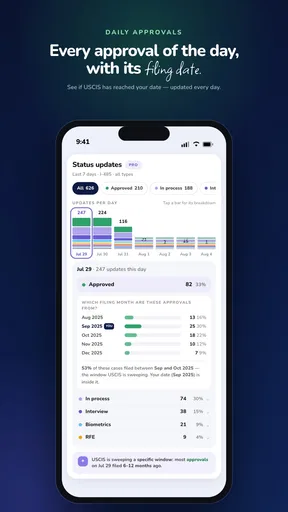
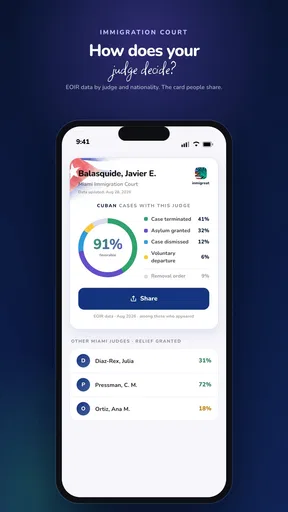
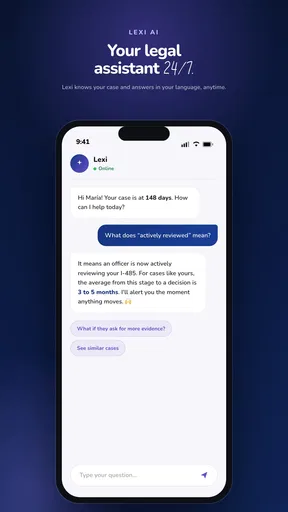
For a person managing one case, the basic workflow is straightforward: open the app, review the current status, and pay attention to alerts or changes. The store summary also points to personal statistics and a place-in-line view, which makes the experience more informative than a simple “case unchanged” screen. Those extra views can help you understand the broader timeline without pretending that an estimate is a promise.
I would still keep official notices, receipt information, and personal documents in a separate, organized place. If a status changes, compare what you see in the tracker with the official communication connected to your case. This is one of the most important habits with any third-party case tool: use it to notice something, then verify the consequence through the appropriate official source.
A realistic everyday example would be someone who works irregular hours and cannot repeatedly visit an official case page. Instead of checking during every break, that person can let the tracker serve as the first signal. If nothing changes, there is no need to spend extra time searching. If an alert appears, the user can then make a more deliberate official check and save any relevant notice.
That workflow is especially helpful for family members who are assisting an applicant. One person may handle the routine monitoring while another keeps the paperwork. The app can reduce duplicated checking, but I would avoid passing around sensitive information casually. A tracker should make coordination easier, not encourage people to forget who has access to case details.
What the personal statistics and line view add
The personal statistics are useful when you want context rather than a single isolated status. Waiting feels different when you can see your own case history or compare the current position with the information the app presents around it. I like that this encourages a more measured view: a case is part of a process, not just a mysterious screen that changes without explanation.
The place-in-line feature can also help users frame expectations. I would treat it as an orientation tool, not a countdown. Immigration processing can depend on case type, office, requests, administrative steps, and circumstances that a general tracker cannot fully capture. The practical benefit is knowing whether your case appears to be moving within the pattern shown by the app, while remembering that the display cannot guarantee when an action will happen.
One non-obvious advantage of this approach is emotional discipline. If you record what you saw and when you saw it, you are less likely to rely on memory after several quiet weeks. I recommend taking a brief note whenever an important change appears, especially if you are coordinating with a lawyer or family member. The app can help you notice the change; your own record preserves the context.
Settings and habits that make the app more useful
Experienced users should spend a few minutes reviewing notification settings instead of accepting every alert without thought. Alerts are valuable only when they are noticeable and understandable. If your phone silences the app, groups its notifications, or places them among dozens of unrelated messages, the feature loses much of its practical value.
I would also check whether the app is allowed to send notifications and whether the phone’s battery settings restrict background activity. These are device-level considerations rather than special claims about the app, but they often explain why a person expects an alert and does not see one. After adjusting anything, I would test the phone’s normal notification behavior and continue checking the app manually when timing matters.
Another setting worth considering is how often you want to engage with the tracker. A person who checks constantly may become more anxious without gaining useful information. A person who never opens it may miss the point of installing it. I prefer a planned rhythm: let alerts draw attention to possible changes, then review the app at a sensible time and verify meaningful developments through official channels.
Because the app is rated for Everyone, it is presented as accessible to a broad audience. That does not mean every immigration situation is simple enough for a general-purpose tracker. Parents, spouses, and relatives may find the interface approachable, but they should still understand whose case they are monitoring and avoid confusing one receipt or application with another.
The current version is 2.3.53, and the app runs on Android 7.0 or later. That makes it available to people using older Android devices, which is helpful for anyone who does not want to replace a working phone just to follow a case. At the same time, older devices can have more aggressive background limits, so notification reliability should be checked rather than assumed.
Using the tracker without creating false confidence
The biggest setting is really a mental one: decide what an alert means before you receive it. I interpret an alert as a prompt to investigate, not as legal advice or a complete explanation. A status label may be brief, while the action required from you could be important. Reading the official notice remains essential.
I would also avoid entering the same case repeatedly just because the wording looks slightly different in another place. Before adding anything, confirm the receipt details you intend to monitor. A clean setup reduces confusion later, particularly when several family members have related applications or when one person is tracking cases for more than one household.
Privacy deserves practical attention too. Case information is sensitive, so I would use a screen lock, avoid displaying notifications where other people can read them, and think carefully before showing the app in public. These are simple habits, but they matter more than squeezing a few extra seconds out of the workflow.
Faster patterns for people managing more than one case
The app becomes more valuable when the user creates a repeatable pattern instead of treating every case as a separate emergency. If you are monitoring several family members, establish a naming or note-taking convention outside the app so you can immediately identify who a case belongs to. Do not rely on vague labels such as “family case” when two applications may be active at once.
A useful routine is to review cases in the same order every time: urgent developments first, then recent changes, then unchanged cases. This prevents a quiet case from consuming the same attention as one that has just moved. It also makes it easier to spot a genuine difference between a new update and a status you have already seen.
Another practical shortcut is to separate observation from action. During a quick check, record which cases changed. Later, when you have the right documents available, investigate those changes carefully. This is more efficient than interrupting work to research every alert immediately, while still preserving a clear follow-up list.
For someone helping a relative, I would suggest agreeing on one person who performs the regular review and one place where follow-up notes are kept. The tracker can provide the signal, but a shared habit prevents multiple people from interpreting the same alert differently. It also avoids the common mistake of assuming that because one person saw a notification, everyone understood what it meant.
The personal statistics and place-in-line information can support these habits by giving you a broader view of progress. I would use them during a weekly review rather than repeatedly throughout the day. Looking at a trend occasionally is more useful than trying to extract meaning from every small refresh.
Where it beats the usual alternatives
The usual alternative is the official case-status website, and that remains the authority I would use for confirmation. Its strength is official access and direct documentation. The drawback is that it can feel like a destination you visit only when worried. Inmigreat is more convenient as a dedicated monitoring companion because it centers the case-tracking task and adds alerts, personal statistics, and a line-position perspective.
Another alternative is relying on email, text messages, or paper notices alone. Those channels may be important, but they can become scattered across a household. A dedicated tracker gives you one place to look first. I would not replace official messages with it; I would use it to reduce the chance that a change goes unnoticed between formal communications.
There is also the option of using a spreadsheet or calendar. Those tools are good for recording appointments, deadlines, and documents, but they do not naturally provide the same case-monitoring focus. A spreadsheet may be better for a complex personal timeline, while this app is better for quickly seeing whether a tracked case has changed. In my view, the strongest setup can use both: the tracker for awareness and a private record for planning.
Advanced limits that experienced users should understand
No case tracker can remove the uncertainty built into immigration processing. The app may help you see a status or estimate a position, but it cannot force an agency action, explain every administrative detail, or determine what a notice means for your legal situation. Anyone facing a deadline, request for evidence, interview issue, or complicated procedural question should seek the appropriate professional guidance rather than relying on an app interpretation.
There is also a difference between speed and certainty. A notification can arrive quickly and still require careful verification. Conversely, a quiet period does not automatically mean something is wrong. I find the app most useful when I resist both extremes: celebrating every small movement as a final victory and treating every delay as proof of a problem.
The free price makes trying it easy, but the app includes optional in-app purchases ranging from $3.99 to $349.99 per item. That is a meaningful consideration. I would inspect what a paid option provides before purchasing and decide whether the extra value matches the number of cases or the level of monitoring I actually need. Someone following one case casually may be satisfied without spending more, while a user managing several cases may evaluate the additional tools differently.
This pricing structure is also why I would avoid subscribing or buying impulsively after receiving an anxious alert. First determine whether the feature solves a recurring problem in your workflow. If the issue is simply that official information needs verification, a purchase may not change the underlying situation. The app can improve organization, but it cannot turn an uncertain process into a guaranteed schedule.
Users should also remember that a high average rating, around 4.9, reflects broad user satisfaction rather than a promise that every case or phone will behave identically. Notification delivery depends partly on device settings and connectivity, and the usefulness of the line view depends on how closely the displayed comparison fits your circumstances.
I would skip this app if you want legal explanations, document preparation, or a replacement for official correspondence. I would also skip it if checking an additional tracker would increase your anxiety without helping you take action. In those situations, a simple calendar, a carefully maintained document folder, or direct professional support may be a better fit.
Questions I would answer before installing
Is it suitable for a single case? Yes, especially if you want a focused way to notice changes instead of repeatedly searching manually. The benefit is convenience, not a new legal channel. For one case, I would keep the routine light and avoid checking so often that the app becomes a source of stress.
Can it replace the official USCIS or EOIR process? No. I would use it as a companion for monitoring and context, then confirm important information through official sources and notices. That distinction is essential whenever an update could affect a deadline or required response.
Is it useful for families? It can be, provided everyone uses a clear identification system and handles case details carefully. The more cases you track, the more valuable a consistent review order and private follow-up record become.
Should you pay for optional features? Only after deciding what problem you need to solve. The free entry point is enough to evaluate whether the basic workflow fits you. If you later consider an in-app purchase, compare its practical benefit with your actual monitoring needs rather than buying because the waiting process feels urgent.
Will it work on an older Android phone? The listed minimum is Android 7.0, so compatible older devices can run it. I would still check notification permissions and battery restrictions, since those settings can affect how reliably alerts appear on any phone.
My verdict after building a repeatable workflow
Inmigreat: USCIS Case Tracker is most convincing when used with restraint. I like it as a focused awareness tool: add the cases you genuinely need to watch, configure notifications thoughtfully, review changes in a consistent order, and verify anything important through official channels. The personal statistics and place-in-line view add useful context, particularly for people who want more than a bare status label.
Its limitations are equally clear. It cannot interpret every case-specific situation, guarantee timing, or replace official notices and professional advice. The optional purchases also deserve careful consideration, especially for users who only need occasional monitoring. Those points do not make the app poor; they define the role it can realistically play.
For an applicant, relative, or organizer who wants a dedicated Android tool instead of scattered checks across websites and messages, I would recommend giving it a measured trial. The strongest results come from combining it with a private document habit, sensible notification settings, and a rule to verify meaningful updates. Used that way, Inmigreat: USCIS Case Tracker does not promise certainty, but it can make the waiting process more organized and less dependent on anxious, repetitive checking.
Verdict
Strengths of Inmigreat: USCIS Case Tracker
- Tracks USCIS case updates in one convenient dashboard.
- Supports multiple applications and case numbers.
- Provides timely notifications when case statuses change.
- Includes useful immigration-related resources and explanations.
- Simple interface makes checking case progress quick and accessible.
Limitations of Inmigreat: USCIS Case Tracker
- It does not influence or accelerate USCIS processing times.
- Some updates may appear later than official USCIS notifications.
- Certain features or resources may require a paid subscription.
- Users must enter sensitive case information, raising privacy concerns.
- The app cannot replace advice from a qualified immigration attorney.
Similar Picks in This Category
View All
Google LLC4.0

Gboard - the Google Keyboard
Google LLC4.5

Google Play services
Google LLC4.3

Google Play Store
Google LLC4.9

Files by Google
Google LLC4.5

SHAREit: Transfer, Share Files
Smart Media4U Technology Pte.Ltd.4.3
Frequently Asked Questions
What is Inmigreat: USCIS Case Tracker used for?
Inmigreat: USCIS Case Tracker is designed to help users monitor the progress of immigration cases handled by USCIS. After entering the relevant receipt information, the app can organize case details and provide status updates in a more convenient format than repeatedly checking the official website. It is useful for applicants, petitioners, and families who want a simple way to follow case activity from a mobile device.
Is Inmigreat: USCIS Case Tracker an official USCIS application?
No. Inmigreat: USCIS Case Tracker should be treated as an independent third-party tracking tool, not as an official application operated by U.S. Citizenship and Immigration Services. It may use publicly available case-status information, but it does not represent USCIS, make immigration decisions, or provide legal advice. For authoritative updates, notices, deadlines, and instructions, users should always verify information through the official USCIS website and their mailed documents.
What information do I need to track my immigration case?
Generally, you will need the USCIS receipt number associated with your application or petition. This is usually a 13-character identifier printed on the Form I-797 Notice of Action and often begins with letters such as EAC, WAC, LIN, SRC, NBC, MSC, IOE, or similar prefixes. Enter the number carefully, because a single incorrect character can prevent the app from finding the case or displaying the correct status.
Can Inmigreat predict when my USCIS case will be approved?
The app may help users follow status changes and, depending on its available tools, provide estimates or general case information, but it cannot guarantee an approval date. USCIS processing times vary according to the form type, service center, workload, background checks, requests for evidence, and individual circumstances. Any prediction should be considered informational only and should not replace official processing-time pages, USCIS notices, or advice from a qualified immigration professional.
Is my personal and immigration information safe when using the app?
Before adding a receipt number or other case details, review the app’s privacy policy, permissions, data practices, and account requirements in the store listing. Avoid entering highly sensitive information unless it is clearly necessary, and never share passwords, Social Security numbers, passport details, or payment information through an unverified channel. Keep in mind that case-status data can be sensitive, so use the app alongside the official USCIS website and maintain reasonable account and device security.
